

Industry and logistics
Production shift power profiles, peaks and distribution costs of multiple halls.
SMART METERING / LIFENEXA ENTERPRISE
Platform for monitoring energy, heat, gas and water across the entire portfolio of facilities. Meters, invoices, photovoltaics, alerts and ESG reports - in the web panel and mobile application.

FROM ONE LOCATION TO THE WHOLE ORGANIZATION
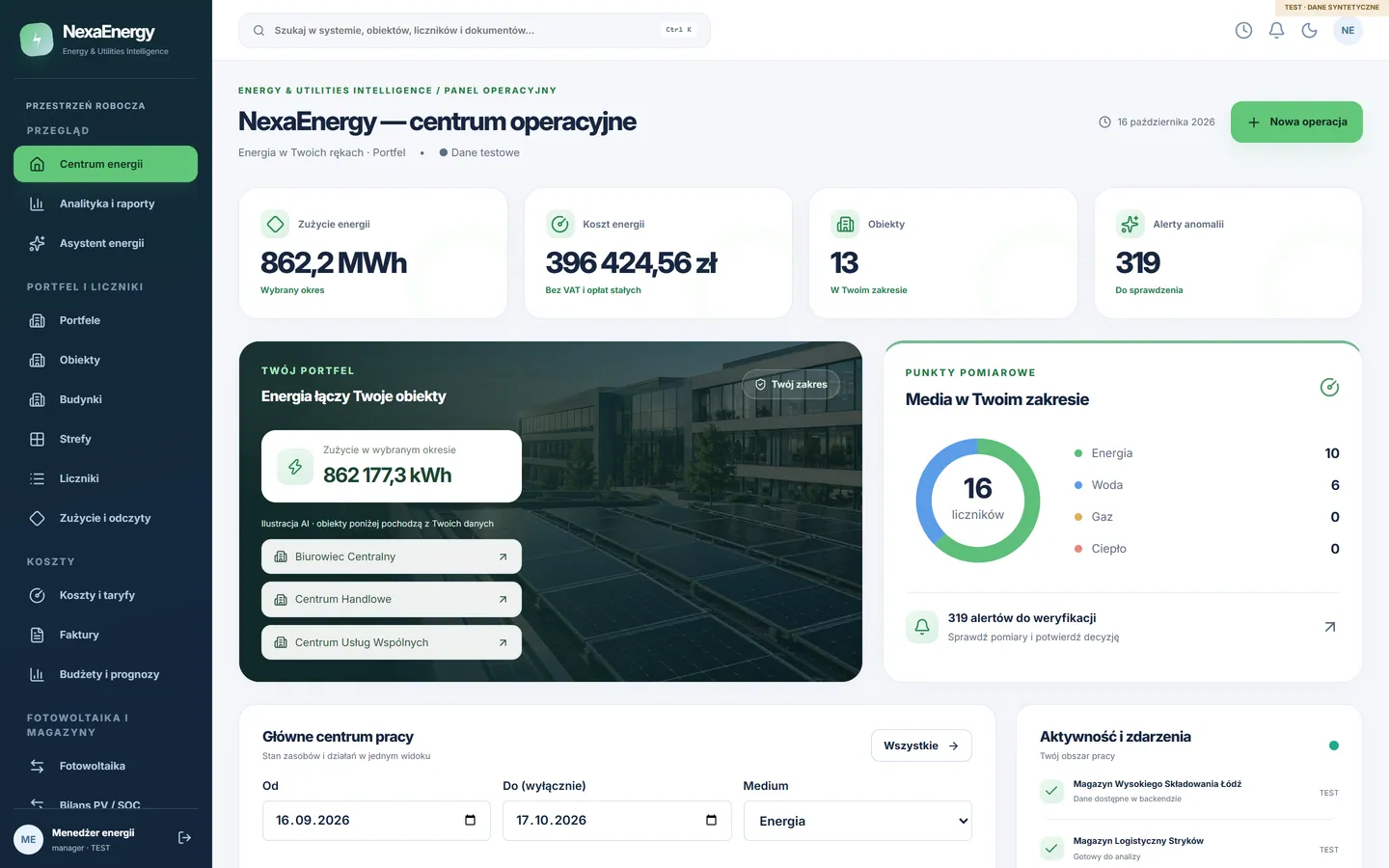
One workspace for meter data, costs, alerts and reports across your team — replacing spreadsheets, separate supplier portals and emails.
All utilities in one register: units, conversion factors, cumulative readings and correction history.
Discover the possibilitiesEnergy, distribution and fixed charges calculated according to the tariff version in force during the period.
Discover the possibilitiesProduction, self-consumption, exports, imports and battery state of charge in one energy balance.
Discover the possibilitiesDemand spikes, missing readings, leaks and budget overruns — with human decisions and an audit trail.
Discover the possibilitiesSite and portfolio reports, CO₂e estimate with explicit ratio, PDF/XLSX/CSV.
Discover the possibilitiesPower profiles, period comparisons and evidence-based proposals approved by manager.
Discover the possibilitiesREAL SCREENS
Click the tab to switch the panel screen or enlarge the view. These are screenshots from a working version of NexaEnergy - the web panel and the Android application use one API and the same data.
The panel and application screens show the Polish version of the interface.
FROM MEASUREMENT TO DECISION
Each step leaves a trace: who imported the data, who confirmed the alert and why. No automatic commands to the infrastructure.
Facility, building, zone and meter. CSV/XLSX import with unit, interval and duplicate control.
Gaps, unrealistic values and cumulative readings are checked, and corrections record their author.
Rules create alert. The assistant compiles measurements, coverage and peak power as evidence.
The manager confirms or rejects with justification, assigns the task and deadline.
Cost by tariff, budget, forecast and CO₂e estimate in PDF or XLSX report.
ONE PLATFORM, MANY ROLES
Permissions are enforced on API and database. The customer only sees his or her organisation, the technician will not change the meter configuration, and the auditor has read-only access.

ROLE · ENERGY MANAGER
Who we serve
Multi-site companies, industrial plants, local governments, schools, hotels, shopping malls, sports facilities and building managers.
Production shift power profiles, peaks and distribution costs of multiple halls.

Public buildings, utilities and budgets in one register with report to council.

Heat, water and energy per facility and zone, comparison of occupancy seasons.

Halls, swimming pools and lighting: peak alerts and photovoltaic balance.

Tenants, submeters and customer settlements separated from the subscription.

Building portfolio, technician readings and owner documents.
ANDROID APP
Technician performs photo reading, manager approves alerts, customer checks portfolio report. Data goes into an encrypted queue and syncs when the network returns - with conflict control instead of overwriting.

COSTS AND INVESTMENTS
A simple scenario with explicit assumptions. In the operator panel, the same process uses tariffs, invoices and measurements of your facilities.
SCENARIO CALCULATOR
Assumptions: constant energy price and baseline consumption, without inflation, discounting, financing, taxes, equipment degradation and seasonality. This is a scenario, not a guarantee of an outcome. Full ROI/NPV analysis with tariffs of your facilities works in the operator's panel.
INTEGRATION AND SECURITY
You see what works out of the box and what requires configuration of provider keys. Nothing is marked as "live" until it is connected and checked.
Validation of units, intervals, duplicates and gaps; audited corrections.
Files generated from backend data within the organisation and role permissions.
Signed installer from the product subdomain; offline readings and synchronisation.
Keys in an encrypted safe, signed webhook.
CRC, transaction verification, notifications.
Preview, issuance, PDF and reconciliation of the document after confirmation.
OIDC/PKCE contracts and licenses ready.
PL templates, queue with retries and delivery history.
Documents and photos; data proposals are always approved by a human.
After verification of the manufacturer's API and scope of permissions; without remote control.
Each query operates in the context of an organisation; base enforces scope through row-level security.
Administrator, manager, technician, customer and auditor have separate permissions in the API.
Admin login requires a one-time code from the authenticator application.
Each change saves the author, time, previous state and trace ID.
Stripe, Przelewy24 and Fakturownia keys are encrypted on the server side and never reach the browser or application.
CSRF, query limits, security headers, data validation and upload limits.
Database copies and recovery procedure checked before each version change.
Data only for the purpose of the service, no advertising or tracking analytics. Privacy Policy and Retention Policy.
WCAG 2.2 AA is a design goal. Formal certifications and an independent security audit are not declared.
PRICE LIST
Choose your scope and billing period. Plans cover up to 10, 50 or 300 meters respectively; larger deployments receive a tailored quote.
First site portfolio
Up to 10 meters
Multi-site teams
Up to 50 meters
Large multi-site organisations
Up to 300 meters
Prices are in PLN, excluding VAT. Hardware, installation, historical data import and custom integrations are quoted separately. The form does not initiate a payment; scope and price are confirmed in the CORE agreement before activation. Larger portfolio? We will prepare a tailored quote.
Reviews
Ratings are submitted by NexaEnergy customers in the mobile app or the web panel.
Loading reviews…
FAQ
Could not find an answer? Contact us and select the application and topic so your enquiry reaches the right person.
No. The platform operates in supervision and reading mode. Critical infrastructure control is disabled and alerts lead to human decisions and tasks for the team.
CSV or XLSX import, manual reading in the panel or in the Android application with a photo. Re-importing the same file does not create duplicates and corrections are saved in the history.
No. The report provides an estimate of CO₂e emissions with a visible coefficient, its source and data coverage. An independent audit is required for formal reporting.
The assistant compiles measurements, data quality and power peaks as evidence, prepares a proposal and a preview. It is approved by the manager with a justification - one task and an entry in the audit are created. This is rule-based analysis; the LifeNexa CORE AI model is enabled separately.
Only users of your organisation, within the scope of their role. Isolation is enforced by the database (row-level security), and the administrator logs in with the MFA code.
Yes, after logging in first. Reads and photos go to an encrypted queue on the device and synchronize when the network returns, with conflict control.
Prices and scope are confirmed before an order. LifeNexa CORE handles the agreement, activation and subscription invoices.
CONTACT
Describe sites, meters and integrations needed. We will respond by email or by phone - whichever you prefer.
Mobile app
Meter readings with photos, alerts and decisions, portfolio reports and documents — even without coverage, in the device’s encrypted queue.
